October 31, 2023 - Written By Greg Watkins, Senior Manager, Delivery Partnerships | Blog Archive
In hopes of offering a replicable model for other communities across the nation, this case study documents the approach taken by Goodwill-Easter Seals of Minnesota (GESMN) and Urban League Twin Cities (ULTC) undertook, working with the Markle Foundation’s Rework America Alliance, to influence systems change in the Twin Cities workforce ecosystem.
System change is a long-term endeavor and the work in the Twin Cities is far from complete; however, these two organizations—with the help of other stakeholders—have not only observed real impact for job seekers over the last two years but also laid a strong foundation upon which the workforce landscape is primed for more positive change.
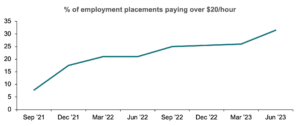
During this two-year partnership, nearly 11,000 job seekers received services, of which 4,826 (44%) identified as Black and 7,150 (63%) did not hold a four-year degree. In the same timeframe the team’s percentage of job seekers placed into jobs paying $20 per hour or more increased significantly, from 7.8% in September 2021 to 31.4% in June 2023.
This initiative took a holistic approach focusing on three key areas:
Although working to improve any one of these areas is valuable, impact was amplified in the Twin Cities by targeting multiple levers within the system, to influence both the workforce supply and demand. On the supply side, the team worked with career navigators to improve job seekers’ ability to represent their skills to employers, while on the demand side they helped employers to implement a skills-first approach to attracting and retaining staff.
Key recommendations described in more detail in the report, include:
Incorporate stakeholder voice. Include as many voices as possible including representatives who could speak to the workforce experience of Black, Indigenous, and People of Color, and whenever possible, from those receiving services.
Focus on what you are best positioned to influence. Most local workforce landscapes are complex so while the vision may be grand, keep your approach simple. Focus on where your organization can achieve impact and take time to become familiar with new approaches and resources internally before engaging external parties.
Establish a culture of continuous improvement. Continually assess efforts and act quickly on data or feedback. Apply an experimental approach to determine what resonates best with local stakeholders.
Top-down support is key. Involve senior leadership from your organization from the beginning. While they may not drive the day-to-day operations, having executive buy-in and messaging furthers organizational adoption.
Start small and scale. In all three areas—career navigation, employer engagement, and community activation—the Twin Cities team started where they could and scaled efforts once the foundation was built. Introduce new practices slowly and increase offerings as interest and buy-in grow.
Ensure the right staff are in the right seats. Take stock of internal skill sets and find the right staff to implement the project. Look at the full breadth of skills that are needed, from training facilitation to project management, and provide support to staff in these areas, while monitor progress throughout.
Read the full case study here.
Access Alliance Resources here